You might be asking yourself, is my remote broken? Perhaps it is because your remote doesn't move your adjustable bed, either right out of the box or the remote just stopped working.
Check the remote connection
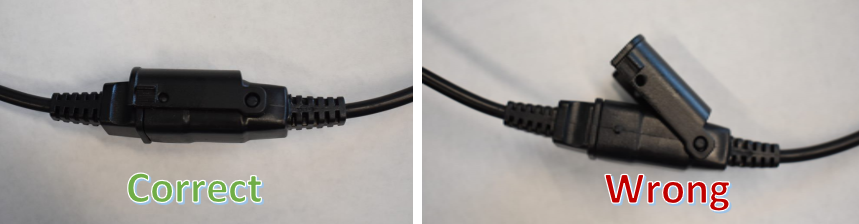
For our wired remotes, check the connection to ensure a snug fit. There are two things to check. First if your remote cable connection is a little loose. This can happen if the securing mechanism is down and blocking the cord from seating snugly. Second thing to check is if the securing mechanism is no longer helping to hold the connections together.
Please refer to the photos provided at the bottom of this article for how this should look.
Power cycle your base
Your adjustable base might need to be unplugged for a little while, 30 seconds to a minute should do it. While it is unplugged, check the cords to ensure they are snug and secure. Start at the wall plug and work your way forward. Sometimes the movement of your base, a pet, or a late night trip to the restroom can jostle the cords loose.
While you are at it, ensure there are no batteries installed in the power supply. Most of our bases come with a compartment in the power supply unit that you can put batteries in to lower your base in the case of a power outage. The batteries will be drained fairly quickly and if left in your base can be why it no longer moves. Everyday operation of your base is powered by the wall outlet. Typically you will not ever need to use the battery backup option on your power supply.
Surge protector and wall outlet check
The surge protection or electrical outlet may not be providing power to your base. Test to see if your wall outlet is providing power by plugging into the same wall plug another device you know works. Do the same with the surge protection where you are plugging in your base.
Child lock on?
Occasionally the child lock setting gets enabled. This can happen when the button sequence for the child lock is triggered. Refer to your owners manual on if your base has a child lock feature. Links for how to disable child lock are at the top of this article.
Pairing the remote
Because our bases are all wired, you will not need to worry about pairing your base.
Check the remote connection - cable snug?
The below photo shows two pictures of a connection. The one on the left is correct and shows the securing mechanism locked in a way that holds the connection points of the two cords together. The photo on the right is of an incorrect connection where the securing mechanism was down when the two cords were attempted to be secured together. Because it was down, the connection is not snug due as the securing mechanism blocked the tip from going in snugly.
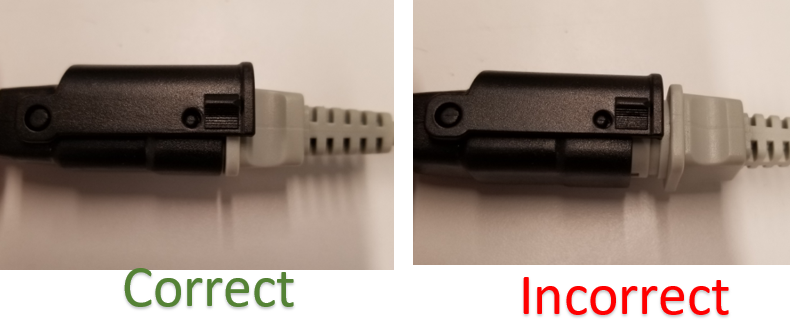
Check the remote connection - securing mechanism in place?
The below photo on the left shows an image of the securing mechanism snapped into place after the two cord tips have been snugly plugged into each other. The photo on the right shows an image of the securing mechanism loose and not pressed down to secure the connection points.